

How to use Visit Japan Web | Tax-free shopping and customs confirmation
How to register for Visit Japan Web
What to prepare
- A smartphone or computer with internet access
- An email address
- A valid passport
- Travel details: arrival date, airline and flight number
- Accommodation details in Japan: hotel address and telephone number
Registration steps
STEP 1: Create an account
- Open Visit Japan Web.
- Select ‘Create a new account’.
- Agree to the terms and privacy policy.
- Enter your email address and password.
- Enter the verification code emailed to you.
- Log in.
Register only through the official Visit Japan Web website. There is no app. Beware of fraudulent, unofficial apps that attempt to steal personal or credit card information.
STEP 2: Register your details
- After logging in, select ‘Your details’.
- Select the appropriate entry or return category.
- Scan your passport with the camera or enter its details manually.
- Check your name, date of birth, nationality and passport number.
- Add basic details and a contact address in Japan as needed.
Important: To use the tax-free shopping QR code, you must scan your passport with the camera.
STEP 3: Register your arrival or return
- Select ‘Register planned entry/return’.
- Create a new entry and enter the trip name (optional), expected arrival date, airline, flight number, departure point, accommodation address and contact details in Japan.
- Check and save your details.
You can also reuse registered travel information or eligible visa information.
STEP 4: Show your QR code on arrival in Japan
- Log in to Visit Japan Web.
- Open your registered arrival or return plan.
- Display the QR code for immigration and customs declarations.
- Show it at a supported terminal or counter.
Additional registration for tax-free shopping
To use the tax-free shopping QR code, complete these additional steps after entering Japan.
STEP 5: Create your tax-free shopping QR code
- Log in to Visit Japan Web.
- Open the tax-free QR code creation screen.
- Scan the QR code on the landing-permission sticker in your passport.
- Display the tax-free shopping QR code.
- Show it at a participating tax-free shop.
The refund system from November 1, 2026
Visit Japan Web has three functions that should not be confused.
| Function | When to use it |
|---|---|
| Immigration and customs declarations | On arrival in Japan |
| Tax-free shopping QR code | At participating tax-free shops |
| Online customs confirmation at departure | When leaving under the refund system |
Customs confirmation with VJW
From November 1, 2026, online customs confirmation through VJW is available over the dedicated Wi-Fi at Narita, Haneda, Kansai, Chubu, New Chitose, Fukuoka and Naha airports.
Registering with VJW or creating a shopping QR code does not guarantee a refund. You must also complete the purchase-related refund procedures and customs confirmation at departure. A refund destination must be registered even if customs confirmation is complete.
STEP 1: Connect your phone to the dedicated Wi-Fi
The dedicated VJW tax-free customs-confirmation Wi-Fi is available near customs terminals. The same connection QR code is used at every airport.

STEP 2: Open Visit Japan Web
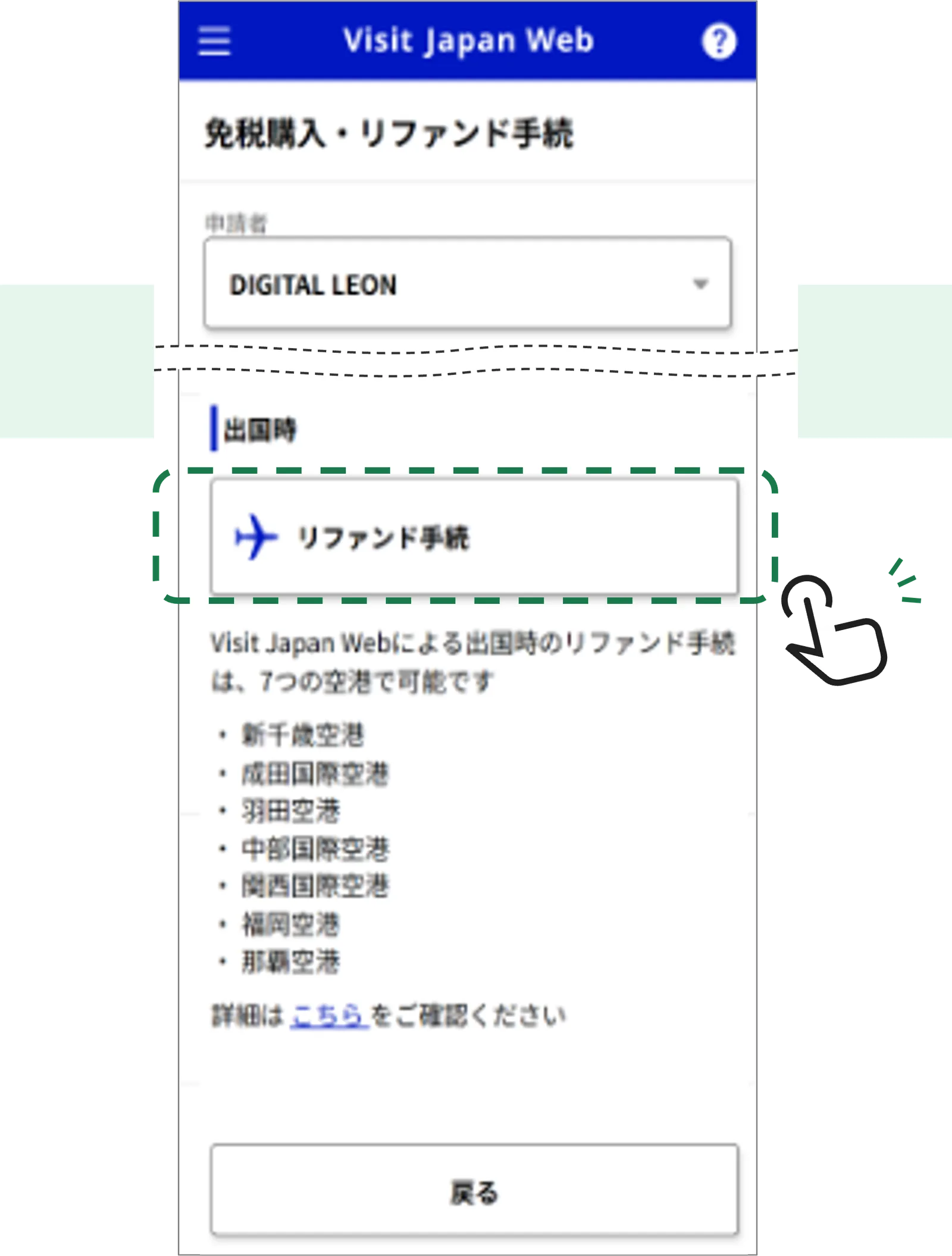
Log in to Visit Japan Web and tap ‘Refund procedures’.
STEP 3: Check your purchase records and proceed
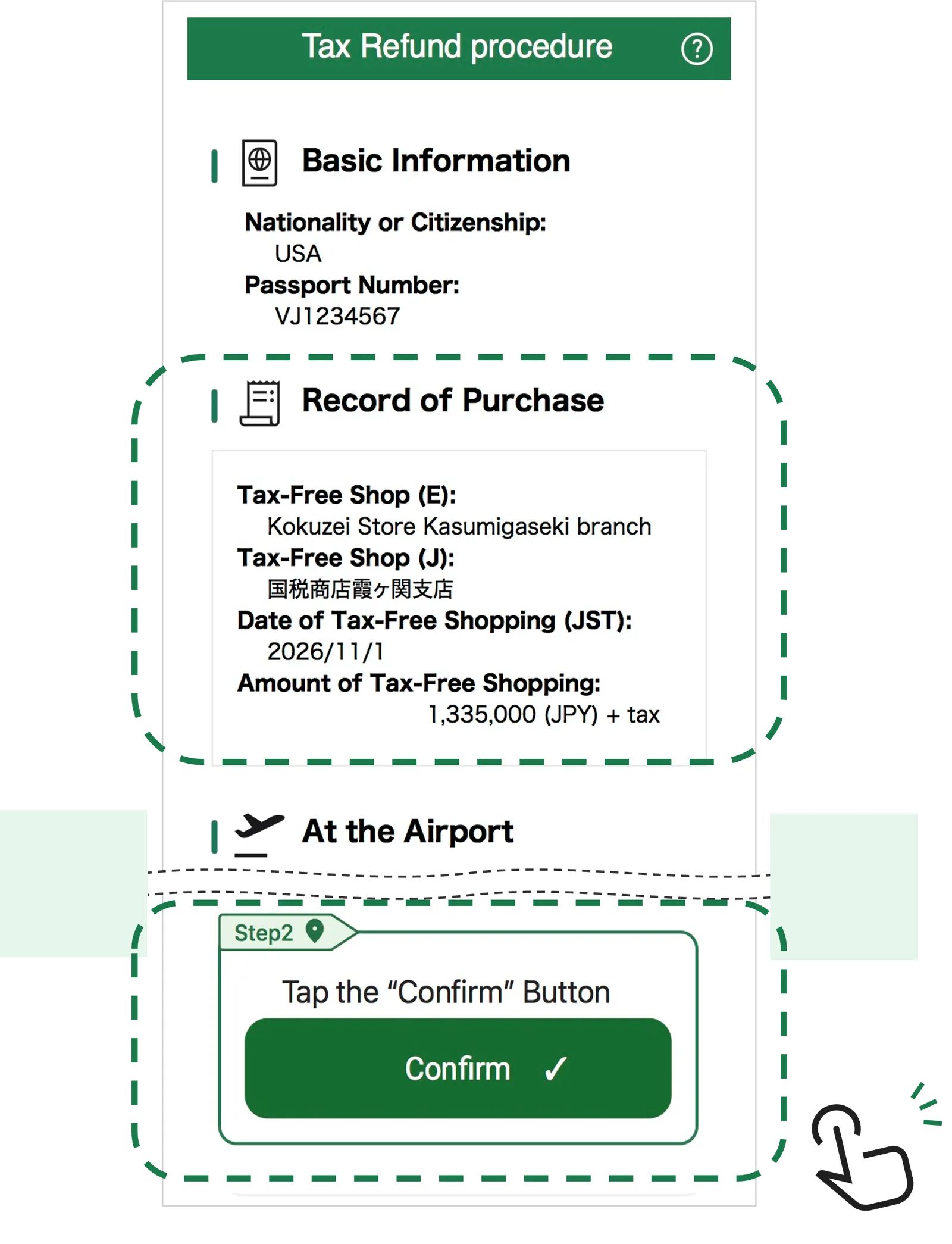
Check the purchase records covered by the procedure and tap ‘Confirm’.
STEP 4: Check the result
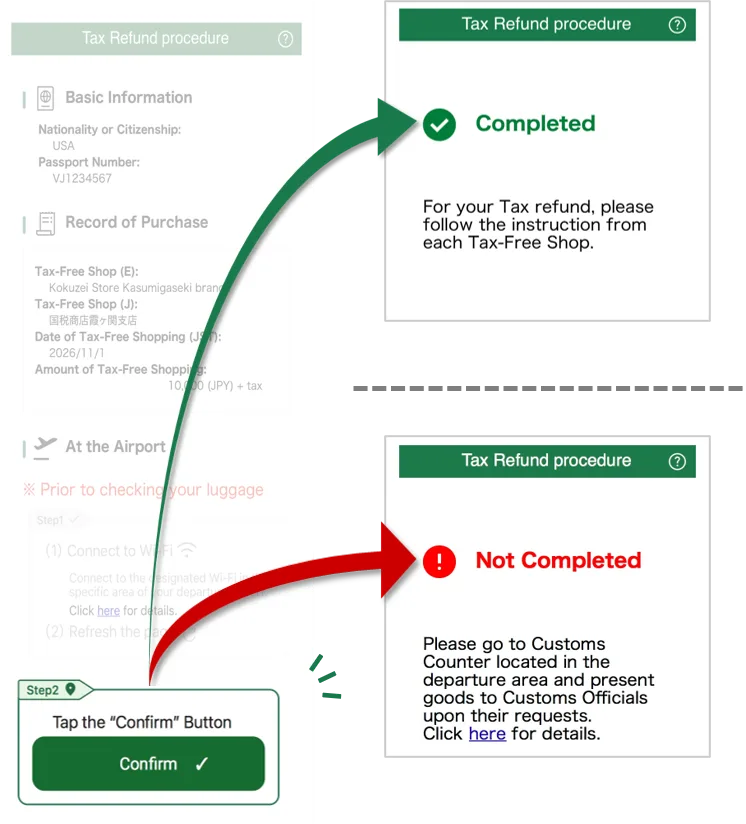
Check the result. If ‘Not Completed’ appears, go to the customs inspection area for confirmation.
Tax-free purchases and refund procedures
Refund procedures
FAQ
Frequently asked questions
Must I register with VJW before entering Japan?
You can register before or after arrival, including after entering with a landing-permission stamp in your passport. Registration and linking can help subsequent tax-free shopping and departure checks.
Can I use VJW for tax-free purchases in shops?
Presenting the tax-free shopping QR code displayed in VJW is legally treated as equivalent to presenting your passport for tax-free sales procedures.
Can I complete departure customs confirmation through VJW?
At the seven major airports (Narita, Haneda, Kansai, Chubu, New Chitose, Fukuoka and Naha), you can complete online export confirmation and check whether inspection is required in the dedicated Wi-Fi area of the international departure lobby. Without VJW, or at other airports and ports, scan your passport at the installed tax-free procedure terminal.
Can I see my tax-free purchase information in VJW?
According to the National Tax Agency, VJW is expected to show purchase history and details of purchase records eligible for refunds.
Does the tax-free shopping QR code expire?
It is valid for 24 hours after creation, or until your permitted stay expires if that is sooner. If it expires, press the refresh button to generate an updated code.
Can I use a screenshot of the tax-free shopping QR code?
No. The code must be displayed live in Visit Japan Web. Screenshots and printed copies cannot be used for tax-free sales procedures.
What else can I do with VJW?
At the seven major airports, electronic gates can read the VJW QR code and your passport for paperless entry. A representative can register accompanying family members, such as a spouse, children or parents, in one account when they do not have a smartphone or need help using one.
What is Visit Japan Web (VJW)?
It is a completely free web service for Japan entry procedures (quarantine, immigration and customs declarations) and tax-free procedures. Use the official website in your phone’s browser; no app is needed. Supported languages: Japanese, English, simplified and traditional Chinese, Korean and Vietnamese.
Can I enter Japan without registering with VJW?
Yes. VJW is optional. You can complete the usual paper arrival and customs declaration forms instead.
What do I need to create an account?
An email address, passport details, name, date of birth, contact details and other user information.